Introduction
Picture this: a production associate opens the label software, hunts through a folder of templates, manually types in the SKU and quantity, double-checks the size, hits print, and hopes the data matches what's actually in the ERP. Repeat that 200 times a shift. Every day. Across every line.
That routine is costing textile and apparel operations real money — in wasted labor, in mislabeled shipments, in retailer chargebacks, and in production slowdowns that quietly add up across every shift.
This article is for operations managers and production leaders who want to fix that. More importantly, it's for those who need a hard dollar figure to justify the investment internally. We'll walk through exactly how ERP labeling integration works, what drives the ROI, and how to build a credible business case using your own numbers.
Key Takeaways
- ERP labeling integration automatically pulls data from your ERP directly to the printer — no manual entry required.
- The biggest ROI drivers are labor time recovered per print job, fewer errors, lower chargeback costs, and faster throughput.
- Calculate ROI by comparing your current annual process cost against the integrated solution cost, then subtract your implementation investment.
- Flat-file and database connections are the simplest integration methods — and the right fit for the majority of apparel operations.
- Tracking baseline metrics before integration gives you the hard numbers needed to prove ROI to stakeholders.
What Is ERP Labeling Integration?
ERP labeling integration connects your enterprise resource planning system — SAP, Epicor, Oracle, Global Shop Solutions, or similar — directly to your label printing software. Instead of an operator manually entering product codes, SKUs, quantities, or shipping info, the label data flows automatically from the ERP to the printer. The operator doesn't touch the data. The printer just runs.
This is different from ERP implementation, which is the process of setting up the ERP itself. Integration is what happens after — connecting that ERP to the other systems your floor depends on, including labeling.
Two Common Connection Methods
Most operations managers assume integration means months of IT development. In practice, two straightforward approaches cover the majority of textile and apparel deployments:
- Database connection — The ERP writes a record to a shared database table. The labeling software monitors that table and triggers the print job automatically when a new record appears.
- Flat-file method — The ERP generates a structured file (CSV or XML) in a designated folder. The labeling software reads the file and prints without any human involvement.
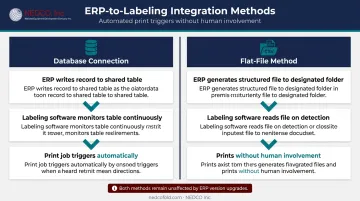
Both methods are simpler than most people expect. Critically, both keep the labeling system independent from ERP version changes: a real benefit every time your ERP is upgraded.
Why Manual Labeling Is Costing Your Operation More Than You Think
The Compounding Labor Drain
Manual label printing isn't one task — it's a chain of small tasks that add up fast. Each print job requires an employee to:
- Open the label application
- Locate the correct template
- Manually key in product data
- Verify quantities and size information
- Hit print and confirm output
When you're running dozens or hundreds of print jobs per shift, those minutes per job multiply into hours per day. A time study of your own floor — tracking each step from software launch to label-in-hand — consistently surfaces more lost time than managers initially estimate.
The Error Cascade
A single wrong SKU or incorrect size label doesn't just mean one reprint. In apparel and textile fulfillment, one labeling error can trigger:
- A reprinted order and replacement shipment
- A retailer chargeback for non-compliant labeling
- A returned shipment that ties up receiving staff
- Damaged trust with a retail buyer that took months to build
GS1 US defines chargebacks as financial penalties for failure to follow agreed labeling and shipment terms — and apparel-specific tagging defects commonly include mis-encoded items, duplicated values, and multiple tags on a single item. Each of these is a direct consequence of manual data handling.
Labeling Bottlenecks on High-Speed Lines
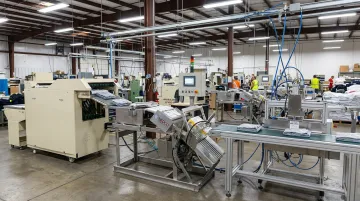
This is where the cost becomes most visible. Automated finishing equipment — garment folders, baggers, sealers, conveyor systems — can move through hundreds of units per hour. Automatic garment packaging lines are rated at up to 700 garments per hour with a single operator, meaning a labeling process that can't keep pace becomes the constraint on your entire line.
NEDCO's Automatic Apparel Labeling System is built for exactly this environment, designed to integrate within a complete production line alongside folding, bagging, sealing, and conveyor equipment. Even so, capable labeling hardware hits a ceiling when each print job still depends on a manual data-entry step to trigger it.
The Hidden Cost of ERP Upgrades
That hardware dependency points to a deeper problem: software coupling. When labeling software is tightly coupled to a specific ERP version, every upgrade becomes a project. SAP's own S/4HANA upgrade documentation confirms that custom code checks, add-on validation, and simplification item checks can extend business downtime during upgrades. A simpler flat-file or database integration, where the ERP just continues writing the same file format, leaves the labeling system untouched — no reconciliation required.
The Key ROI Drivers of ERP Labeling Integration
Labor Cost Savings
Recovered time is only valuable if you price it correctly. Operations managers should use the fully burdened labor rate — not just base wages — when calculating savings. This figure includes wages plus benefits plus the employer's share of overhead allocated to that role.
According to the U.S. Bureau of Labor Statistics, private-industry manufacturing compensation averaged $48.27 per employee hour worked in early 2026, comprising $32.20 in wages and $16.07 in benefits. Your fully burdened rate will vary based on additional overhead allocations, but BLS compensation data gives you a defensible starting point for the calculation.
Apply that rate to the time eliminated per print job, multiplied by daily print volume, multiplied by 250 working days. For a facility running 500 print jobs per day and saving two minutes each, that arithmetic often clears $50,000 annually before any other ROI factors are counted.
Error Reduction and Accuracy Gains
When the ERP record is the source of truth and no one is retyping it, transcription errors stop at the source. The downstream effects are concrete:
- Fewer reprints and wasted label stock
- Reduced compliance violations and the audit exposure that comes with them
- Fewer chargebacks hitting accounts receivable from mislabeled shipments
Increased Throughput
When a print job is triggered automatically by an ERP transaction — a completed work order, a shipment confirmation — the label is ready when the garment is. There's no queue of waiting operators, no delay between finishing and labeling. In a high-volume apparel line running multiple shifts, that recovered time per cycle compounds into measurably more orders processed per shift, without adding headcount.
Scalability Without Proportional Staffing
As order volume grows, a manual labeling process grows with it — meaning more operators, more training, more risk of inconsistency. An integrated system scales with volume automatically. A facility doubling its order count doesn't double its labeling labor; the ERP triggers handle the increase. That flattening cost curve is one of the strongest long-term ROI arguments for growing apparel operations.
How to Build Your ROI Case: A Step-by-Step Framework
Step 1 — Audit Your Current Process
Before you change anything, document these baseline metrics:
- Number of label print jobs per day
- Average time per print job (from opening software to label in hand)
- Fully burdened labor rate of employees performing the printing
- Number of labeling errors per day or week
- Average time and labor cost to correct each error
- Downstream costs from errors: chargebacks, reprints, return processing
This baseline is your "before" number — the benchmark every savings claim will be measured against.
Step 2 — Estimate Post-Integration Costs
The ROI formula has three components:
- Current annual cost — Total labor hours on manual labeling × fully burdened rate, plus annual error-related costs
- Integrated solution annual cost — Software licensing, maintenance, and any ongoing IT support
- One-time implementation investment — Configuration, testing, and go-live costs
The difference between (1) and (2), sustained over multiple years, offsets (3). When savings exceed the implementation investment, you've hit your payback point.
Step 3 — Calculate Payback Period and Multi-Year Savings
Use a plug-your-own-numbers model structured like this:
| Year | Annual Labor Savings | Annual Error Cost Reduction | Total Annual Benefit | Cumulative Net (After Implementation Cost) |
|---|---|---|---|---|
| Year 1 | [Your figure] | [Your figure] | [Sum] | [Benefit minus implementation cost] |
| Year 2 | [Your figure] | [Your figure] | [Sum] | [Prior cumulative + Year 2 benefit] |
| Year 3 | [Your figure] | [Your figure] | [Sum] | [Prior cumulative + Year 3 benefit] |
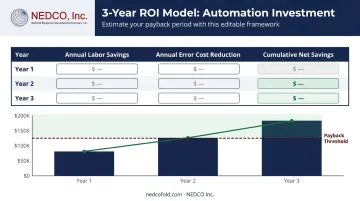
A 3-to-5-year model shows decision-makers not just when the investment pays back, but how much total value it generates over the system's useful life.
Step 4 — Track and Report Post-Integration
ROI doesn't end at go-live. Set up ongoing KPI tracking for:
- Print job cycle time (ERP trigger to label in hand)
- Error rate measured as mislabels per 1,000 print jobs
- Reprint volume caused by labeling errors
- Order throughput per shift
Reporting these numbers monthly turns a one-time business case into an ongoing record of operational improvement — which is what earns budget for the next initiative.
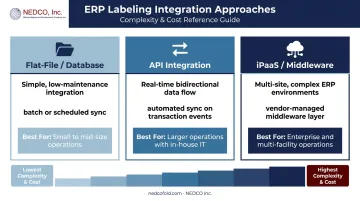
Three Common Approaches to ERP Labeling Integration
Flat-File and Database Integration
The simplest and most widely deployed approach. The ERP writes order or production data to a shared folder or database table; the labeling software monitors that location and triggers the print job when new data appears.
When the ERP is upgraded, it only needs to continue generating the same file format — the labeling system is completely unaffected. This decoupling cuts IT risk and maintenance overhead over time.
Best for: Most small to mid-size textile and apparel operations without dedicated integration teams.
API Integration
Some modern ERP platforms support direct API connections to labeling software, enabling real-time bidirectional data flow. A work order completion in the ERP can instantly trigger a print job with no polling delay.
The speed advantage over file-based polling is real, and the ability to send status updates back to the ERP opens up tighter workflow automation.
Best for: Larger operations with in-house IT resources who can manage ongoing API maintenance and version compatibility.
Third-Party Middleware and iPaaS
iPaaS tools sit between the ERP and labeling system, handling data translation and routing in the cloud. MuleSoft defines iPaaS as a suite of cloud services for developing, executing, and governing integration flows — covering cloud-to-cloud, cloud-to-on-premises, and B2B scenarios.
This approach makes sense for environments like a multi-site apparel manufacturer running separate ERP instances across three warehouse locations, where routing logic alone would overwhelm a simple file-based setup.
Best for: Enterprise-scale operations where integration complexity — multiple ERP instances, multiple labeling systems, or both — justifies the higher licensing and implementation costs. If you don't have that complexity, a simpler approach will almost certainly deliver better ROI faster.
Frequently Asked Questions
What is ERP system integration?
ERP system integration connects an ERP platform to other business applications — such as labeling software, warehouse management systems, or CRMs — so data flows automatically between them without manual re-entry. The result is accurate, real-time data across every connected system without duplicate entry.
What are three approaches to ERP system integration?
The three primary approaches are: (1) flat-file or database integration, which is simple and low-maintenance; (2) API integration, which enables real-time bidirectional data flow; and (3) iPaaS or middleware platforms, which provide scalable, cloud-based integration for complex or multi-site environments.
What are the stages of ERP system implementation?
Implementation stages vary by vendor. Oracle NetSuite uses six phases — Discovery and Planning, Design, Development, Testing, Deployment, and Support. Microsoft Dynamics 365 uses five stages. Labeling integration is typically configured during the development or testing phase, before go-live.
How do you calculate ROI from ERP labeling integration?
Compare the annual cost of your current manual labeling process — labor, error-related rework, chargebacks, and downtime — against the annual cost of the integrated solution plus the one-time implementation investment. When cumulative savings cross that total, you've hit payback.
How long does it take to see ROI from labeling and ERP integration?
It depends on print volume and error rates, but most facilities see measurable cost savings within the first year. Full investment recovery typically occurs within a 1-to-3-year window, with returns accelerating as volume grows.
What metrics should you track before implementing labeling integration?
Document daily print job count, average time per print job, fully burdened labor rate of printing operators, daily error and reprint rate, cost per labeling error, and any chargeback or compliance fine history related to mislabeling. These are your baseline numbers for proving ROI after go-live.